
Last updated on
M2: OPCache GUI
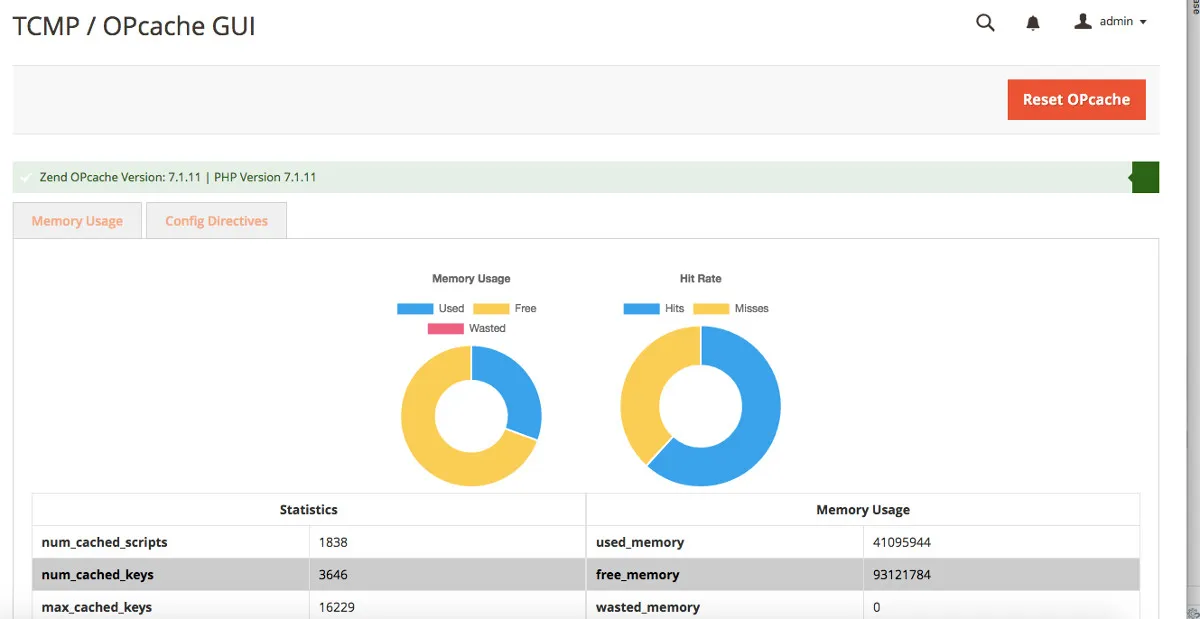
Now you can easily view the statistics for PHP OPcache in your Magento admin panel. TCMP OPcache GUI displays current memory usage / hit rate / configuration values. You can optionally enable the display of all cached scripts, including details about them, and a quick reset link for the menu (Stores > Configuration > TCMP Studio > OPcache).
Installation:
composer require tcmp/opcache
php bin/magento module:enable TCMP_OpCache
php bin/magento setup:updgrade
php bin/magento setup:static-content:deploy
Example:
More Information:
Supports: Magento 2.x (System Requirements) PHP 7.x (OPCache Documentation)
The source: https://github.com/theycallmepepper/m2-opcache-gui
Packagist listing: https://packagist.org/packages/tcmp/opcache
Charts built with Chart.js
Version for Magento 1 (and inspiration for this version): https://github.com/SchumacherFM/Magento-OpCache/